Build Your Own Animated Pixel Player Card
How I made the retro RPG card on my GitHub profile, which class to pick for your job, and a copy-paste prompt to generate your own.
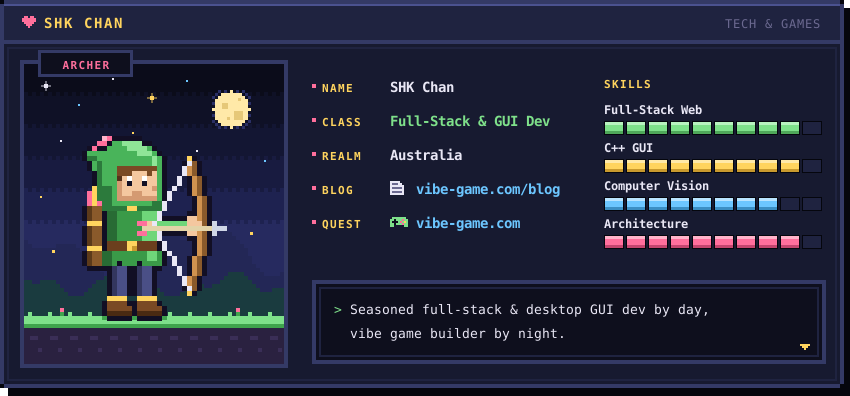
Why a Player Card?
A GitHub profile is usually a wall of badges. I wanted mine to feel like the character select screen of an old RPG: a hero sprite that idles and shoots arrows, a short stat sheet, and a skill tree that says what I actually build.
The whole card is a single SVG file. Every pixel is a <rect>, and the motion is plain CSS @keyframes with steps() timing, so it moves in choppy frames like a real sprite. No JavaScript, no GIF, no external images. GitHub renders it straight from the repo, and it stays sharp at any width.
You don’t need to place 1,000+ rectangles by hand. Describe your character to an AI model, paste the result into player-card.svg, open it in a browser, and ask for tweaks until it looks right.
Pick a Class That Fits Your Job
The class is the most fun part. Choose one whose weapon or pose says something about how you work:
| Your role | Class idea | Sprite and animation hint |
|---|---|---|
| Full-stack developer | Archer | Draws the bow and fires an arrow across the card: hits targets at any range. |
| Backend / infrastructure | Knight | Shield up, slow idle bob: the one holding the wall. |
| Frontend / UI engineer | Mage | Staff with a blinking spark: turns ideas into visible magic. |
| Data / ML engineer | Alchemist | Bubbling potion, rising pixel bubbles: mixes data into insight. |
| DevOps / SRE | Engineer | Wrench and a turret that pings: keeps the machines running. |
| Security engineer | Rogue | Hooded, dagger glint, a lock that clicks open. |
| Game developer | Bard | Lute with floating music notes: makes worlds people play in. |
| Designer | Illusionist | Paint brush trailing colored pixels. |
| Product / project manager | Paladin | Banner waving: leads the party and keeps quests on track. |
| Student / career changer | Apprentice | Book that flips pages: level 1, gaining XP fast. |
A few tips from building mine:
- Keep it short. Name, class, a one-line tagline, three or four skills. The card is a teaser, not a CV.
- One main animation. An idle bob plus one signature move (the arrow, the spark) reads better than everything blinking at once.
- Limit the palette to 6 to 10 colors. A dark navy background with one warm accent (gold, pink) looks instantly “retro”.
- Leave out private details. Use a handle instead of your full name and a country instead of a city.
- Bust the cache. GitHub caches images hard. When you update the card, change the URL in your README from
player-card.svg?v=1to?v=2.
The Prompt
Fill in the parts in [brackets] and paste the whole thing into Claude or another capable model. Save the reply as player-card.svg in your profile repo (the repo named after your username), then add this to its README.md:
<div align="center">
  <img src="./player-card.svg?v=1" width="100%" alt="My pixel player card" />
</div>
Create an animated pixel-art "player card" as a single self-contained SVG file
for my GitHub profile README. Output only the SVG code.

ABOUT ME
- Display name: [your handle]
- Class: [e.g. Archer / Mage / Knight] (my job: [your role])
- Title line in the header: [e.g. TECH & GAMES]
- Stats rows (label: value): NAME: [handle] | CLASS: [job title] |
  REALM: [country] | BLOG: [url or remove] | QUEST: [project url or remove]
- Skills (3-4, each with a pixel progress bar): [skill 1], [skill 2], [skill 3], [skill 4]
- Tagline at the bottom: [one short line, e.g. "Backend dev by day, game builder by night."]

LAYOUT
- viewBox about 850 x 400, dark retro RPG window: thick pixel border,
  notched corners, header bar with a small pixel heart icon, the name and title.
- Left side: a framed portrait panel with my character sprite (about 32x40
  "pixels", each pixel a 4x4 <rect>) standing on a small grass/stone tile,
  with a few twinkling stars and one small flying creature in the background.
- Right side: the stat rows (small gold uppercase labels, bold light values),
  then the skills with segmented progress bars.
- Tagline centered along the bottom edge.

STYLE
- Every pixel is a <rect> on a 2px or 4px grid; use shape-rendering="crispEdges".
- Palette of 6-10 colors: dark navy background (#171a30 / #1f2340), lighter
  border (#343a66), gold accent (#ffd45e), pink accent (#ff6f9c), off-white text.
- Monospace font only: font-family="Consolas, 'Courier New', monospace".

ANIMATION (CSS in a <style> block inside the SVG)
- Hero idle bob: translateY(-4px) at 50% using steps(1), about 1.4s loop.
- One signature move for my class: [e.g. draws a bow and an arrow flies across
  the card / staff spark blinks / shield flashes]. Swap between two sprite poses
  with opacity keyframes so it reads as frame-by-frame animation.
- Twinkling stars and a blinking cursor using steps() timing.
- Do NOT wrap animations in prefers-reduced-motion; they must always play.

GITHUB CONSTRAINTS
- No JavaScript, no <foreignObject>, no external images, fonts or links:
  GitHub serves README SVGs as images, so only inline shapes, text and CSS work.
- Keep the file under 150 KB.
Open the file in a browser to check it, then iterate in the same chat: “make the hero bigger”, “slow the arrow down”, “swap the pink for teal”. When you’re happy, push it and enjoy your new character select screen.